|
|
Create Booking From Contract > Field Descriptions |


Create Booking From Contract - Field Descriptions
The Create Booking From Contract (OPCNW02) screen is used to search an existing Contract. From here you can navigate to the View Contract (OPCNW03) screen to view any existing Contract and create a Booking from it.
The fields, links, and buttons available in the Create Booking From Contract (OPCNW02) screen 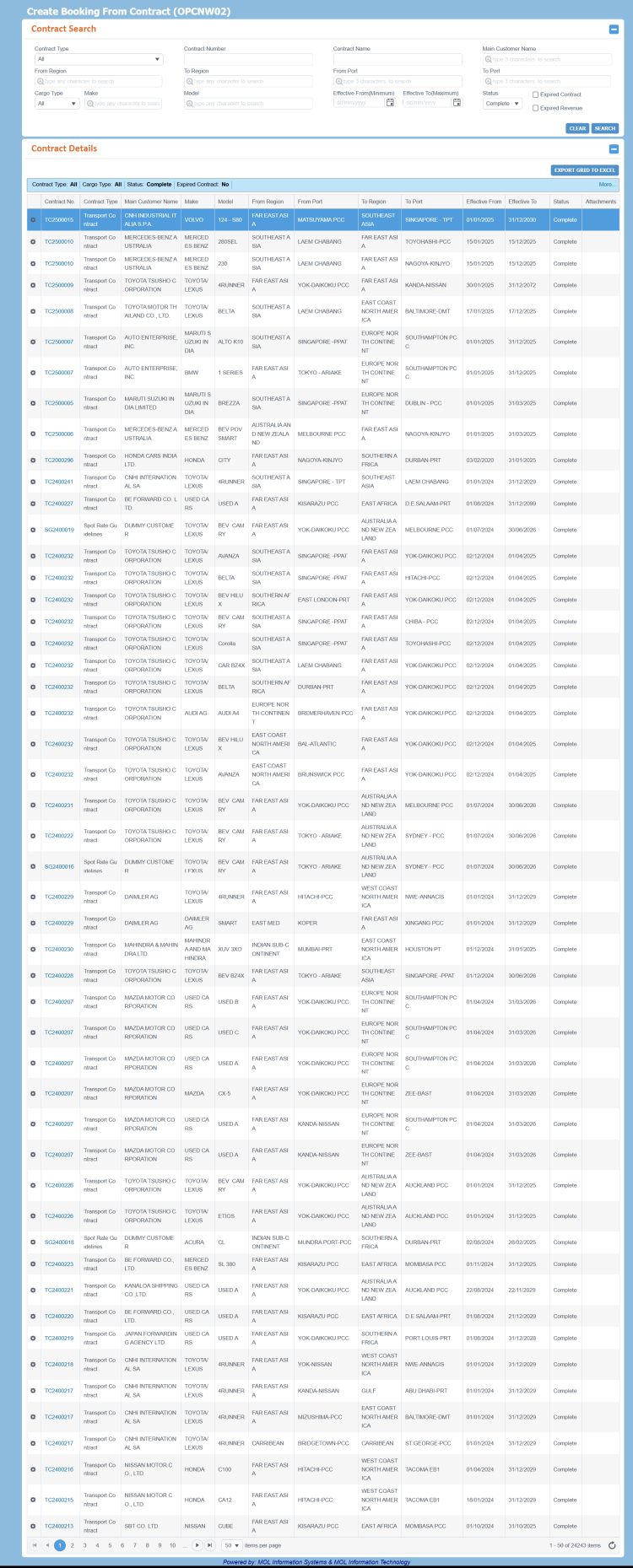 are described below. For a description of additional icons, buttons, fields and links appearing on this screen, see Common Interface Controls.
|
Field |
Description |
|
Initially, this panel is displayed as expanded to enter search criteria. Once the search is performed and the search results are displayed, the panel collapses automatically. |
|
|
Contract Type |
Drop-down list to select the type of Contract to be retrieved. Available values are:
The values are defined by PCC.NET Administrative users in the Code Definition (ADCMW02) screen (domain = CONTRACT_TYPE, for development usage only). |
|
Contract Number |
The unique identification number of the Contract. To search for a particular Contract (if the number is known), enter the appropriate Contract number. |
|
Contract Name |
Name of the Contract. |
|
Main Customer Name |
Name of the main customer associated with the Contract. This field has the Auto-complete feature, which helps you to populate the relevant name of the main customer as you type first three characters of the name. |
|
From Region |
Name of a valid region name from where the shipment originates. This field has the Auto-complete feature, which help you to populate the relevant name of the region as you type the first three characters of the name. Auto-populated when From Port is entered. |
|
To Region |
Name of a valid region name where the shipment is destined to. This field has the Auto-complete feature, which help you to populate the relevant name of the region as you type the first three characters of the name. Auto-populated when To Port is entered. |
|
From Port |
Name of a valid 7-character PCC port of loading associated to a Contract to be retrieved. This field has the Auto-complete feature, which help you populate the relevant name of the Port, that belong to the selected region, as you type the first three characters of a Port's name. Otherwise, all Ports registered in PCC.NET are displayed. |
|
To Port |
Name of a valid 7-character PCC port of discharge associated to a Contract to be retrieved. This field has the Auto-complete feature, which help you to populate the relevant name of the Port, that belong to the selected region, as you type the first three characters of a Port's name. Otherwise, all Ports registered in PCC.NET are displayed. |
|
Cargo Type |
Type of the cargo associated with the Contract to be retrieved. Available values are:
|
|
Make |
Name of the manufacturer of the vehicle, associated with the retrieved Contract. The field has the Auto-complete feature, which helps you to populate the relevant name of the company as you start typing the name. |
|
Model |
The corresponding Model name. The field has the Auto-complete feature, which helps you to populate the relevant name of the Model as you start typing the name. |
|
Effective From (Maximum) |
The date from which the Contract is effective. You cannot enter a date earlier than 01-Jan-2000 and later than 31-Dec-2099. |
|
Effective To (Minimum) |
The date till which the Contract is effective. You cannot enter a date earlier than 01-Jan-2000 and later than 31-Dec-2099. |
|
Status |
Drop-down list to select the status of the Contract to be retrieved. Available values are:
|
|
Expired Contract |
Check box to search inactive Contracts, if those exist. |
|
Buttons |
|
|
CLEAR |
Button to clear the entered search criteria to initiate a new search. |
|
SEARCH |
Button to search and retrieve the Contracts based on the provided search criteria. |
|
Notes:
For a Contract, each combination of From Port - To Port and Make Models are displayed as separate record under the Contract Details panel. A Contract can have multiple From Port - To Port combinations, and each From Port - To Port combination can have multiple Makes and Models. If a Contract has multiple From Port - To Port combinations, then that Contract number will appear multiple times in the search result. Similarly, if a Contract has multiple Makes and Models under a single From Port - To Port combination, then multiple rows are displayed in the Contract Details panel for each Make and Model. |
|
|
|
Gear Icon to access following action that you can perform on the corresponding record.
|
|
Contract No. |
The unique identification number of the retrieved Contract. The Contract number is displayed a hyperlink which can be clicked to view the latest revision of the particular Contract in the View Contract (OPCNW03) screen. You can proceed to create a Booking from this Contract using the View Contract (OPCNW03) screen. The name of the Contract can also be seen when you hover the mouse pointer on the respective Contract. Logic for generating a Contract Number: In PCC.NET, a Contract number has a 9 digit number. The format of a Contract number is TC/AB/AC/SG/QTYYNNNNN and it consists of three sections as mentioned below:
|
|
Contract Type |
Type of the retrieved Contract. |
|
Main Customer Name |
Name of the main customer associated with the retrieved Contract. For Spot Rate Guidelines, this field displays DUMMY CUSTOMER. |
|
Make |
Name of the manufacturer of the vehicle, associated with the retrieved Contract. |
|
Model |
Description of the model, associated with the retrieved Contract. |
|
From Region |
Name of the region from where the shipment originates. |
|
From Port |
Name of the port from where the shipment originates. |
|
To Region |
Name of the region to where the shipment is destined. |
|
To Port |
Name of the port to where the shipment is destined. |
|
Effective from |
The date from which the Contract is effective. The Effective From and To dates define the validity period of the Contract. |
|
Effective to |
The date till which the Contract is effective. The Effective From and To dates define the validity period of the Contract. |
|
Status |
Status of the retrieved Contract. |
|
Attachment |
Number of the files attached with the retrieved Contract. To view the files attached in the Upload Attachment dialog box, click the hyperlink. |

|
Related Topics |