

Create Booking From Contract > Upload Attachment Dialog Box > Field Descriptions
|
|
Create Booking From Contract > Upload Attachment Dialog Box > Field Descriptions |
Use the Upload Attachment dialog box to view the already uploaded files against a Contract in this dialog box. You can also upload/download a file against a particular Contract. You can attach multiple documents. The default file types that are accepted are: .xls, .xlsx, .doc, .docx, .txt, .ppt, .pptx, .jpg, .gif, .jpeg, .bmp, .png, .pdf, .msg) related to the Contract.
This Upload Attachment dialog box can be accessed from:
Contract Search screen: When you search for a Contract, the matching Contracts are retrieved under the Contract Details panel. Click the hyperlink in the Attachments column to view the files attached in the Upload Attachment dialog box.
Create Contract screen: While creating a new Contract, you can click ATTACHMENT to attach documents in the Upload Attachment dialog box after browsing and selecting the desired file. You can also download a file related to this Contract either by clicking the file name shown in the Summary panel.
The fields, links, and buttons available on the Upload Attachment dialog box 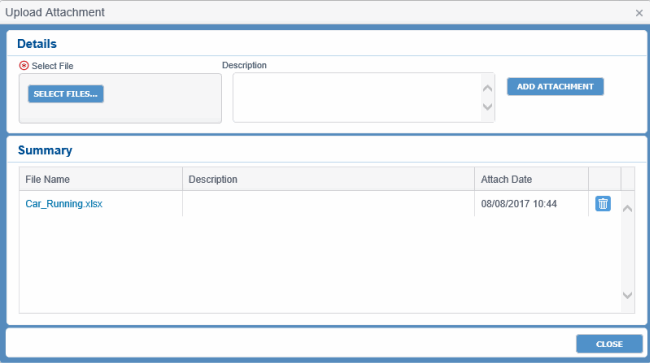 are described below.
|
Field |
Description |
|
Details panel |
|
|
Select File |
Hyperlink to select the file to be attached with the Contract. |
|
Description |
Short description for easy identification. |
|
ADD ATTACHMENT |
Button to attach documents after browsing and selecting the desired file from the appropriate location. |
|
Summary panel |
|
|
File Name |
File name of the attached file. The File name displays as a hyperlink. You can download a file related to this Contract by clicking the file name. |
|
Description |
Short description for easy identification. |
|
Attach Date |
System date when the file was attached. |
|
|
Button to remove the file from the list after selecting the check box adjacent to the file name. |
|
CLOSE |
Button to close the dialog box. |
