Update Cargo Details in Macro-Enabled File
Follow the steps given below to enter cargo information in the macro-enabled (.xlsm) file format and upload it to PCC.NET:
- Save the PN15014 - Cargo Details Upload sample format.xlsm file in your local folder to use it for entering the cargo information.
- Open the .xlsm file.
- Click the Enable ContentEnable Content option to activate the contents in the file. Else, you will not be able to edit the contents.
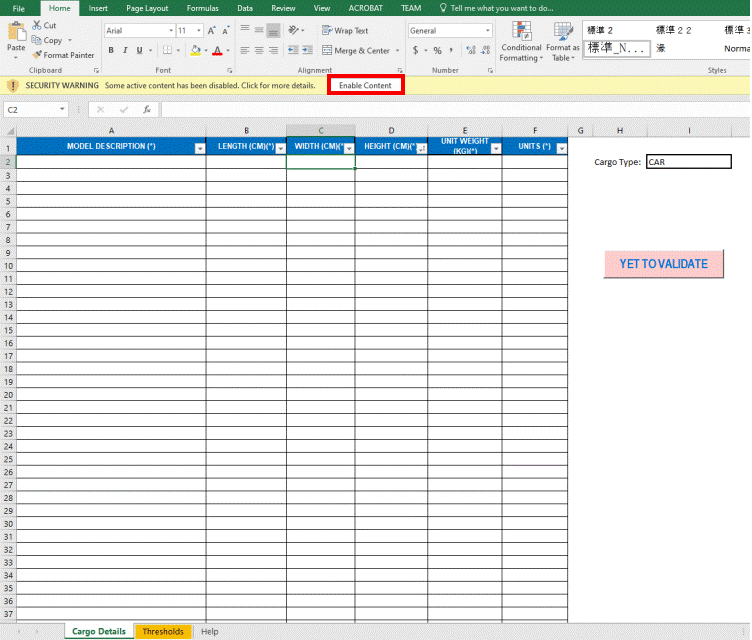
- Select a Cargo Type from the respective drop-down list.
- Enter detailsdetails of Model Description, Length, Width, Height, Unit Weight, and Units.
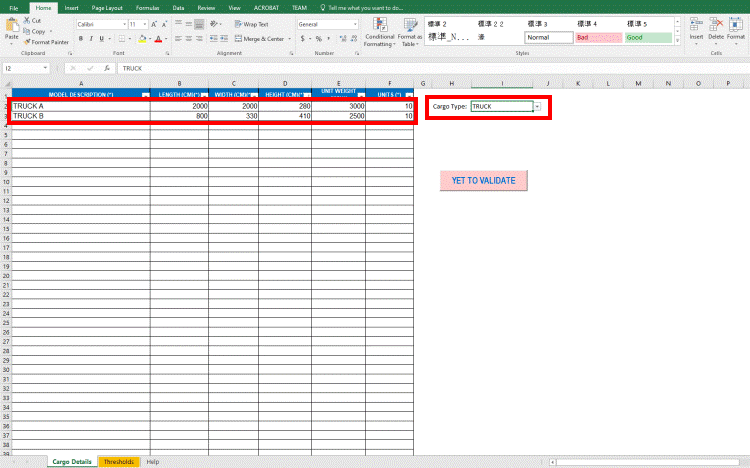
- Click YET TO VALIDATE to check Length, Weight, and Height values you have entered against the corresponding threshold values for the selected cargo type.
Notes:
- If you have entered any invalid value that does not fall between the threshold parameter range defined against the cargo type, that value gets highlighted in red. If valid, it remains black. The button name changes to VALIDATED.
- If you change the cargo type, the values need to be validated again. In such case, the button name changes again to YET TO VALIDATE.
- Save the file.
- Upload the file to PCC.NET through the Cargo Details dialog box of Create/Update Booking (OPBKW02) screen.
PCC.NET does not validate the cargo values during upload. You can upload the file even if some values exceed the thresholds ranges, as allowance is required for special cargoes.
|
Related Topics |