|
|
|
-
Approve Line legsApprove Line legs - For Voyage Controllers
To approve LINE Booking route, you need Approve Line Booking system action and proper delegation of PCC Line with Approve Booking (LINE) role.
- Open the LINE(s) & PCL Mass Approval (OPBKW04) screen.
- Enter the desired search criteria in the appropriate fields of the Search Criteria pane.
Search only for Line leg as Category for which approval is required. For field descriptions of the panel, click here.
To update route status of multiple Bookings, you need to select Bookings of same Route Status.
- Select the Bookings by selecting the corresponding check boxes.
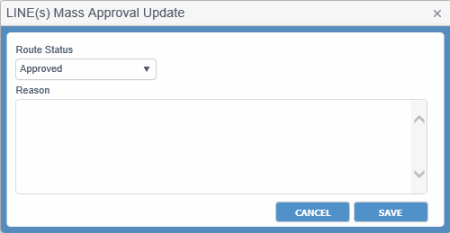
- Click APPROVE/REJECT. The LINE(s) Mass Approval Update dialog box appears. For field descriptions of the dialog box, click here.
- Update Booking's approval of Route Status to Approved after checking space in the intended/actual vessel.
- Click SAVE.
Notes:
- In case of transshipment, the Voyage Controller must approve each leg.
- You cannot select voyage. It remains disabled.
- During approving a Booking, if a port present in the Booking route is deleted for a Voyage, PCC.NET displays an error message asking you to change the Route.
- The Booking status automatically becomes Accepted if all route legs get approved and all Booking validations are passed. Similarly, if all legs are approved for a particular Booking and then the route status of the 'first' leg changes from Approved to Not Approved or Rejected, PCC.NET updates the Booking status back to Requested from Accepted. This scenario does not affect the Booking status which is reconciled.
- If a Booking is in Reconciled status and it’s Discharge Port (DP) falls under US territory, PCC.NET checks for the availability of FMC documentation during Route Leg approval for that Booking. In absence of FMC documentation, route leg approval is not possible and it shows error for FMC.
- If all Bookings selected for Route Leg approval are in Requested Status and one/more Bookings have their Discharge Port (DP) falling under US territory without FMC Filing information, a warning message appears informing that FMC filing is not yet done for those Requested Bookings and will ask your agreement whether to proceed further for Leg Approval or not. On your approval, PCC.NET will approve the legs, but keep all those Bookings in Requested status for which FMC documentation is not available. If you disagree to proceed, however, the selected route legs will not be approved.
-
Reject Line leg approvalReject Line leg approval - For Voyage Controllers
- Open the LINE(s) & PCL Mass Approval (OPBKW04) screen.
- Enter the desired search criteria in the appropriate fields of the Search Criteria pane.
Search only for LINE(s) leg for which approval is required. For field descriptions of the panel, click here.
- Click APPROVE/REJECT. The LINE(s) Mass Approval Update dialog box appears. For field descriptions of the dialog box, click here.
- Update Booking route Approval Flag to Rejected if you find it impossible to load cargo during checking Space Utilization.
- Enter a proper reason for rejection in the Reason field.
- Click SAVE. The Booking user receives intimation about the rejection of the leg.
-
Approve PCL legsApprove PCL legs - For Area Managers
To approve PCL Booking route, you need Approve PCL Booking Route system action with Approve Booking (PCL, Feeder) role.
- Open the LINE(s) & PCL Mass Approval (OPBKW04) screen.
- Enter the desired search criteria in the appropriate fields of the Search Criteria pane.
Search only for PCL leg as Category for which approval is required. For field descriptions of the panel, click here.
- Select the Bookings by selecting the corresponding check boxes.
Notes:
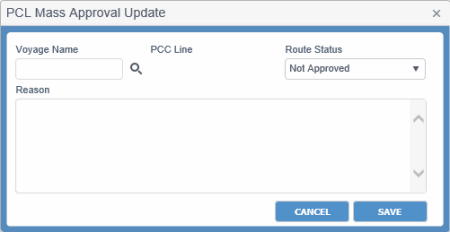
- Click APPROVE/REJECT. The Mass Approval Update for PCL appears. Display of this dialog box differs for the PCL (with Voyage) or LinePCL (with Voyage) or Line category and PCL (without Voyage)PCL (without Voyage) category. For field descriptions of the dialog box, click here.
- Update Booking's approval of Route Status to Approved after checking space in the intended/actual vessel.
- Click SAVE. On saving, PCC.NET checks whether PCL schedule is already registered or not. If not registered, an error message appears.
|
Field
|
Description
|
|
Route Status
|
Status values for the Line or PCL route leg approval are:
-
Approved
-
Not Approved
-
Rejected
|
|
Reason
|
Reason for rejecting the route approval request. It should be provided if status gets rejected. You can enter maximum of 4000 characters.
If you open this dialog box to update a record, Reason gets populated with previously saved reason. For multiple records, it remains blank. On saving, Reason is saved against all selected records.
|
|
Buttons
|
|
CANCEL
|
Button to exit the dialog box without saving your updates.
|
|
SAVE
|
Button to save the route leg status based on selected Route Status.
|
|
Field
|
Description
|
|
Voyage Name
|
Voyage Number. This value can be selected for PCL category when voyage schedule for PCL is not available. On selection of proper PCL Voyage, corresponding PCC Line is populated.
|
|
PCC Line
|
PCC Line of the voyage. Read-only.
|
|
Route Status
|
Status of the approval for route leg:
-
Approved
-
Not Approved
-
Rejected
|
|
Reason
|
Reason for rejecting the route approval request. It should be provided if status gets rejected. You can enter maximum of 4000 characters.
If you open this dialog box to update a record, Reason gets populated with previously saved reason. For multiple records, it remains blank. On saving, Reason is saved against all selected records.
|
|
Buttons
|
|
CANCEL
|
Button to exit the dialog box without saving your updates.
|
|
SAVE
|
Button to save the route leg status based on selected Route Status.
|
Notes:
- The Booking status automatically becomes Accepted if all route legs get approved and all Booking validations are passed. Similarly, if all legs are approved for a particular Booking and then the route status of the 'first' leg changes from Approved to Not Approved or Rejected, PCC.NET updates the Booking status back to Requested from Accepted. This scenario does not affect the Booking status which is reconciled.
- If a Booking is in Reconciled status and it’s Discharge Port (DP) falls under US territory, PCC.NET checks for the availability of FMC documentation during Route Leg approval for that Booking. In absence of FMC documentation, route leg approval is not possible and it shows error for FMC.
- If all Bookings selected for Route Leg approval are in Requested Status and one/more Bookings have their Discharge Port (DP) falling under US territory without FMC Filing information, a warning message appears informing that FMC filing is not yet done for those Requested Bookings and will ask your agreement whether to proceed further for Leg Approval or not. On your approval, PCC.NET will approve the legs, but keep all those Bookings in Requested status for which FMC documentation is not available. If you disagree to proceed, however, the selected route legs will not be approved.
|
|


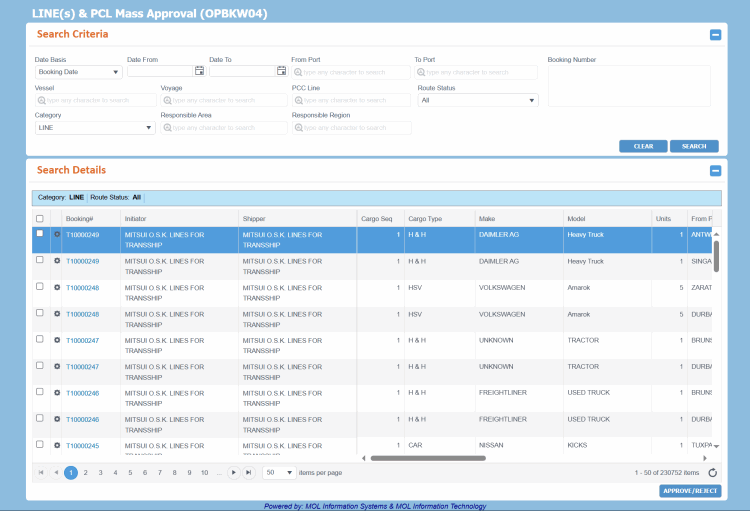 can be accessed from Menu> Operational > Booking > LINE(s) & PCL Mass Approval.