|
|
LINE(s) & PCL Mass Approval> Field Descriptions |


LINE(s) & PCL Mass Approval - Field Descriptions
The fields, links, and buttons available on the LINE(s) & PCL Mass Approval (OPBKW04) screen 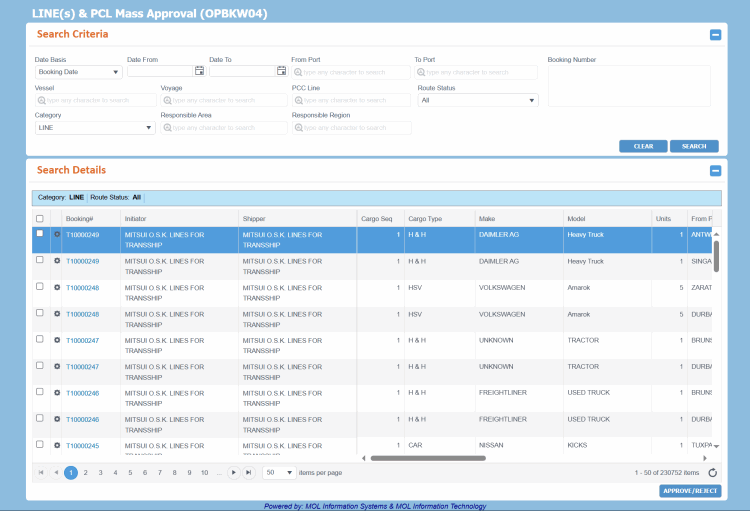 are described below.
For a description of additional icons, buttons, fields and links appearing on this screen, see Common Interface Controls.
|
Field |
Description |
||||||||||||||||||||||||||||
|
Search Criteria... Enter following search criteria to retrieve Bookings. |
|||||||||||||||||||||||||||||
|
Date Basis |
Drop-down list to indicate the event date based on which you want to retrieve the Bookings. The available values are:
The drop-down list values are defined in the Code Definition (ADCMW02) screen (domain= BKG_DATE_BASIS, for development usage only, by PCC.NET Administrative users). |
||||||||||||||||||||||||||||
|
Date From, Date To |
Start and end dates of the date range of the selected event to search your Bookings. All Booking in between these dates are fetched. You can use the Calendar |
||||||||||||||||||||||||||||
|
From Port, To Port |
Start and end PCC ports of the search criteria. All Booking matching these ports are fetched. These fields have the Auto-Complete feature, which help to populate the port name as you start typing it. |
||||||||||||||||||||||||||||
|
Booking Number |
Booking Number you want to search. You can enter multiple Booking Numbers separated by comma (,) or in new lines. |
||||||||||||||||||||||||||||
|
Vessel |
Vessel associated with this leg of the journey. |
||||||||||||||||||||||||||||
|
Voyage |
Voyage Number. On selecting vessel, corresponding voyage will be available for selection. Only active Voyages are available for selection to search Bookings. |
||||||||||||||||||||||||||||
|
PCC Line |
PCC Line of the voyage. On selecting the vessel and voyage, the corresponding PCC Line is automatically populated. |
||||||||||||||||||||||||||||
|
Responsible Area |
Area code (corresponding to the Load Port) as registered in the Location Master (RFLCW10) screen. This field has the Auto-Complete feature, which helps to populate the relevant area name as you start typing it. |
||||||||||||||||||||||||||||
|
Responsible Region |
Region code (corresponding to the Load Port) as registered in the Location Master (RFLCW10) screen. This field has the Auto-Complete feature, which helps to populate the relevant region name as you start typing it. |
||||||||||||||||||||||||||||
|
Category |
Category of the route leg to be search. LINE is selected by default. The drop-down list values are defined in the Code Definition (ADCMW02) screen (domain= BKG_RTCAT, for development usage only, by PCC.NET Administrative users). |
||||||||||||||||||||||||||||
|
Route Status |
Status of the approval for route leg:
Route Status appears as a hyperlink which when clicked, will show the saved Approval/Rejection reason in read-only mode. The drop-down list values are defined in the Code Definition (ADCMW02) screen (domain= RT_STATUS, for development usage only, by PCC.NET Administrative users). |
||||||||||||||||||||||||||||
|
Search Details... Bookings retrieved based on the criteria you searched. |
|||||||||||||||||||||||||||||
|
|
Icon to access a menu of actions that you can perform on the corresponding record. The following action is available:
|
||||||||||||||||||||||||||||
|
Booking# |
Booking Number. The Booking is hyperlinked clicking which you can navigate to the View Booking (OPBKW03) screen to view its information. |
||||||||||||||||||||||||||||
|
Initiator |
Name of the associated customer who is the initiator of the Booking. |
||||||||||||||||||||||||||||
|
Shipper |
Name of the associated Shipper customer type. |
||||||||||||||||||||||||||||
|
Cargo Seq |
Cargo sequence number of the Booking. |
||||||||||||||||||||||||||||
|
Cargo Type |
Cargo Types present in the Booking. |
||||||||||||||||||||||||||||
|
Make |
Make associated with the corresponding Booking. |
||||||||||||||||||||||||||||
|
Model |
Model name of the cargo present in the Booking. |
||||||||||||||||||||||||||||
|
Units |
Number of cargo units present in the Booking. |
||||||||||||||||||||||||||||
|
From Port |
The Load Port of the associated Booking leg. |
||||||||||||||||||||||||||||
|
C/O |
Indicates if it is the first or second call that the cargo is being loaded from the Load Port. Sometimes a vessel calls at the same port twice. |
||||||||||||||||||||||||||||
|
To Port |
The Discharge Port of the associated Booking leg. |
||||||||||||||||||||||||||||
|
C/O |
Indicates if it is the first or second call that the cargo is being loaded from the Discharge Port. |
||||||||||||||||||||||||||||
|
Voyage Name |
Vessel to perform this leg of the journey along with the Voyage Number. You can click the voyage name hyperlink to navigate to the Voyage Schedule (MOL Operating)(VYVYW09) screen, which opens the voyage details in read-only mode. |
||||||||||||||||||||||||||||
|
PCC Line |
PCC Line of the voyage. |
||||||||||||||||||||||||||||
|
ETA (From) |
Expected Time of Arrival of vessel at From Port. |
||||||||||||||||||||||||||||
|
ETD (From) |
Expected Time of Departure of vessel at From Port. |
||||||||||||||||||||||||||||
|
ETA (To) |
Expected Time of Arrival of vessel at To Port. |
||||||||||||||||||||||||||||
|
ETD (To) |
Expected Time of Departure of vessel at To Port. |
||||||||||||||||||||||||||||
|
Route Status |
Status of the approval for route leg. |
||||||||||||||||||||||||||||
|
Buttons |
|||||||||||||||||||||||||||||
|
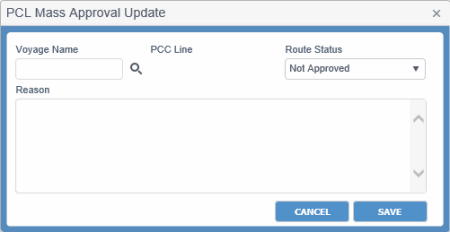
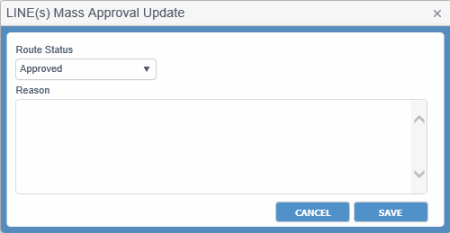
Button to approve the Line or PCL legs. On clicking this button, the Mass Approval Update dialog box appears. Display of this dialog box differs for the PCL (with Voyage) or LinePCL (with Voyage) or Line category and PCL (without Voyage)PCL (without Voyage) category.
|
|||||||||||||||||||||||||||||
 icon to select the date.
|
Related Topics |