Back Forward

Feeder Mass Approval/Arrangement

Feeder Mass Approval/Arrangement


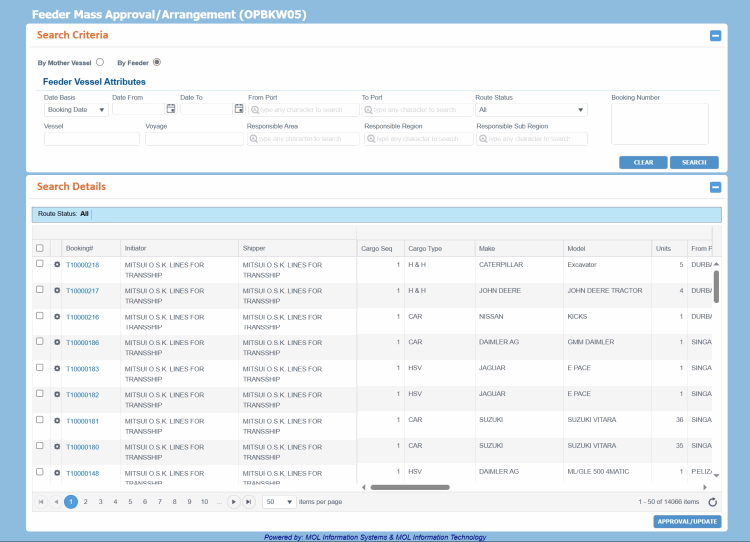
The Feeder Mass Approval/Arrangement screen lets you approve, arrange, or reject the Feeder legs of multiple Bookings at once. You can search for specific Feeder legs to approve/arrange using this screen.

Notes:

The Feeder Mass Approval/Arrangement (OPBKW05) screen can be accessed from Menu> Operational > Booking > Feeder Mass Leg Approval/Arrangement.
Ensure that you have the appropriate permissions to access the screen and perform the necessary tasks. Follow your local support procedures if you are unsure as to whether you have the correct permissions.

General Information

Screen-specific Components

  • Access DetailsAccess Details

    The screen can be accessed by privileged users with the following system actions and role types:

    • To open this screen and search for Feeder Approval Status, you need the View Feeder Booking Route Approval system action with the Approve Booking (PCL, Feeder) and Approve Booking (LINE) roles.

    • To approve Feeder Booking route, you need the Approve Feeder Booking Route system action and proper delegation of Geographical/Location Hierarchy with the Approve Booking (PCL, Feeder) role.

  • Points to RememberPoints to Remember

    • To update route status of multiple Bookings, you need to select Bookings of same From Port and To Port.

    • To approve Feeder legs, you (Area Manager) can select all the feeder legs which originated from and are destined to the same port pairs. For the respective vessel, voyage, ETD (From), ETA (To), ATD (From), ATA (To) and Route Status, if they have the same value in the selected feeder legs, that value gets displayed in the corresponding field of Feeder Mass Approval Update dialog box. In case, the selected feeder legs have different values for the respective vessel, voyage, ETD (From), ETA (To), ATD (From), ATA (To) and route status, the corresponding values in Feeder Mass Approval Update dialog box are left blank and you must enter those values before saving the approval details. PCC.NET displays the current values for the above mentioned fields against the selected legs just below the dialog box to be selected before applying new feeder details.

    • The Booking status automatically becomes Accepted if all route legs get approved and all Booking validations are passed. But if any essential information is missing, you must provide the required information and then change the Booking Status manually.

    • Similarly, if all legs are approved for a particular Booking and then the route status changes for the 'first' leg from Approved to Not Approved or Rejected, PCC.NET updates the Booking status back to Requested from Accepted. The change in Booking status happens only for the first leg and Accepted Bookings; it does not apply to a Booking in Reconciled status.

    • If a Booking is in Reconciled status and it’s Discharge Port (DP) falls under US territory, PCC.NET checks for the availability of FMC documentation during Route Leg approval for that Booking. In absence of FMC documentation, route leg is not possible and it shows error for FMC.

    • If all Bookings selected for Route Leg approval are in Requested Status and one/more Bookings have their Discharge Port (DP) falling under US territory without FMC Filing information, a warning message appears informing that FMC filing is not yet done for those Requested Bookings and will ask your agreement whether to proceed further for leg approval or not. On your approval, PCC.NET approves the legs, but keeps all those Bookings in Requested status for which FMC documentation is not available. If you disagree to proceed, however, the selected route legs are not approved.

    • If Feeder vessel and voyage values are updated in Feeder Approval process, the corresponding Load and Discharge VIN events for the earlier Feeder vessel and voyage get soft deleted.

How do I?

FAQs

  • Approve/update Feeder LegsApprove/update Feeder Legs

    To approve Feeder Booking route, you need the Approve Feeder Booking Route system action and proper delegation of Geographical/Location Hierarchy with the Approve Booking (PCL, Feeder) role.

    1. Open the Feeder Mass Approval/Arrangement (OPBKW05) screen.
    2. Enter the desired search criteria in the appropriate fields of the Search Criteria panel to search for the Feeder leg for which approval is required. You can search using either of the two options: By Mother Vessel or By Feeder Vessel. For field descriptions of the panel, click here.

    To update route status of multiple Bookings, you need to select Bookings of same From Port and To Port.

    1. Select the Bookings by selecting the corresponding check boxes in the Search Details panel.
    2. Click APPROVE/UPDATE. The Feeder Mass Approval Update dialog box appears. For field descriptions of the dialogue box, click here.
      1. Select the Route Status of the feeder leg as Approved or Arranged.
    • You (Area Manager) can approve the feeder legs for which approval is required first and arrange the feeder afterwards. Normally, during approval Feeder Transport Mode details may not be available, you can simply approve the leg and come back later to provide these details and select the status as Arranged. After arranging the feeder, update information about Feeder Vessel, Truck or Burge or any other transporter when such transportation service is used for the Feeder leg.
    • You can update ETA and ETD irrespective of whether approval is required or not for feeders. ETD is auto-populated from the Booking. If PCC.NET finds a registered feeder for the "From Port" to "To Port" location and the entered ETD, ETA is auto-populated as per that registered Feeder Service Schedule. The ETA is also calculated based on the Transit Time mentioned in the Feeder Service.
      1. Click SAVE.

    Notes:

    • To approve Feeder legs, you (Area Manager) can select all the feeder legs which originated from and are destined to the same port pairs. For the respective vessel, voyage, ETD (From), ETA (To), ATD (From), ATA (To) and Route Status, if they have the same value in the selected feeder legs, that value gets displayed in the corresponding field of Feeder Mass Approval Update dialog box. In case, the selected feeder legs have different values for the respective vessel, voyage, ETD (From), ETA (To), ATD (From), ATA (To) and route status, the corresponding values in Feeder Mass Approval Update dialog box are left blank and you must enter those values before saving the approval details. PCC.NET displays the current values for the above mentioned fields against the selected legs just below the dialog box to be selected before applying new feeder details.

    • The Booking status automatically becomes Accepted if all route legs get approved and all Booking validations are passed. But if any essential information is missing, you must provide the required information and then change the Booking Status manually.

    • Similarly, if all legs are approved for a particular Booking and then the route status changes for the 'first' leg from Approved to Not Approved or Rejected, PCC.NET updates the Booking status back to Requested from Accepted. The change in Booking status happens only for the first leg and Accepted Bookings; it does not apply to a Booking in Reconciled status.

    • If a Booking is in Reconciled status and it’s Discharge Port (DP) falls under US territory, PCC.NET checks for the availability of FMC documentation during Route Leg approval for that Booking. In absence of FMC documentation, route leg is not possible and it shows error for FMC.

    • If all Bookings selected for Route Leg approval are in Requested Status and one/more Bookings have their Discharge Port (DP) falling under US territory without FMC Filing information, a warning message appears informing that FMC filing is not yet done for those Requested Bookings and will ask your agreement whether to proceed further for leg approval or not. On your approval, PCC.NET approves the legs, but keeps all those Bookings in Requested status for which FMC documentation is not available. If you disagree to proceed, however, the selected route legs are not approved.

    • If Feeder vessel and voyage values are updated in Feeder Approval process, the corresponding Load and Discharge VIN events for the earlier Feeder vessel and voyage get soft deleted.

Return