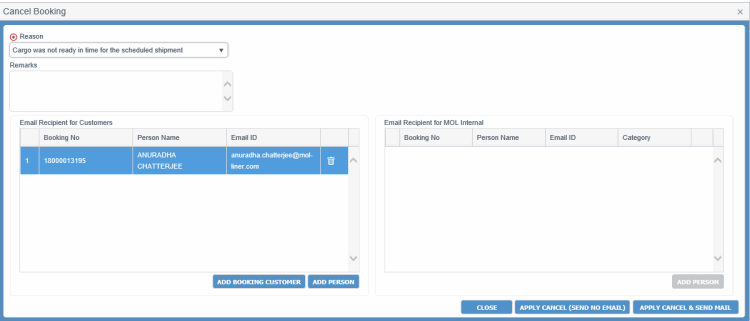
Cancel Booking
|
Field |
Description |
||||||||||||||
|
Reason |
|||||||||||||||
|
Reason |
Drop-down list to select the reason for cancellation. This is required to cancel a Booking. Some of the valid reasons for Cancellation of a Booking would be:
The drop-down list values are defined in the Code Definition (ADCMW02) screen (domain= CANCEL_REASON, for development usage only, by PCC.NET Administrative users). |
||||||||||||||
|
Remarks |
Space to provide remarks in maximum 4000 characters. It is required when reason is Others. |
||||||||||||||
|
Email Recipient for Customers This panel displays e-mail addresses of the logged-in user against each selected Bookings by default. |
|||||||||||||||
|
Booking No |
Customer-requested Booking Number, which you want to cancel. |
||||||||||||||
|
Person Name |
Name of the recipient of the notification e-mail. By default, the e-mail address of the logged-in user is populated for each of the Bookings to be cancelled. |
||||||||||||||
|
Email ID |
E-mail ID of the recipient. |
||||||||||||||
|
|
Button to delete the corresponding recipient. |
||||||||||||||
|
ADD PERSON |
Button to create blank row for adding a new recipient of the e-mail. |
||||||||||||||
|
ADD BOOKING CUSTOMER |
Button to selecting all categories of Booking customers. A pop-up Add Booking CustomerAdd Booking Customer appears when you click this button.
|
||||||||||||||
|
Email Recipient for MOL Internal This panel displays e-mail addresses of Contract/Booking Sales Persons or Approver along with his/her names and categories against all selected Accepted/Reconciled Bookings by default. |
|||||||||||||||
|
Booking No |
Customer-requested Booking Numbers having Booking status Accepted or Reconciled against which the recipient is being added. |
||||||||||||||
|
Person Name |
Name of the recipient of the notification e-mail. By default, the e-mail address of the logged-in user is populated for each of the Bookings to be cancelled. |
||||||||||||||
|
Email ID |
E-mail ID of the recipient. |
||||||||||||||
|
Category |
Category Name of the Person (Sales Person/Approver). |
||||||||||||||
|
|
Button to delete the corresponding recipient. |
||||||||||||||
|
ADD PERSON |
Button to create blank row for adding a new recipient of the e-mail. This button is disabled if you are cancelling Bookings which are not in Accepted or in Reconciled status. |
||||||||||||||
|
Buttons |
|||||||||||||||
|
APPLY CANCEL (SEND NO EMAIL) |
Button to cancel the selected Booking(s) without sending any e-mail for the cancellation to any recipient. Note:
|
||||||||||||||
|
APPLY CANCEL AND & SEND MAIL |
Button to cancel the selected Booking(s), provided no associated active B/L exists against that Booking and queue up e-mails for each e-mail recipients specified in the Email Recipient for Customers and Email Recipient for MOL internal panels. |
||||||||||||||
|
CLOSE |
Button to close the dialog box. |
||||||||||||||
